
Absenteeism Data in the HIE
In collaboration with DC Public Schools (DCPS), parents can consent to having their child’s attendance data shared with the DC HIE. CRISP DC then displays the data within the HIE Portal for the students’ care team members to see.
Where can I find a student’s attendance data within the HIE?
When you open CRISP DC from the Portal or InContext application, you will be able to find student attendance data within Clinical Information, under Health Records.
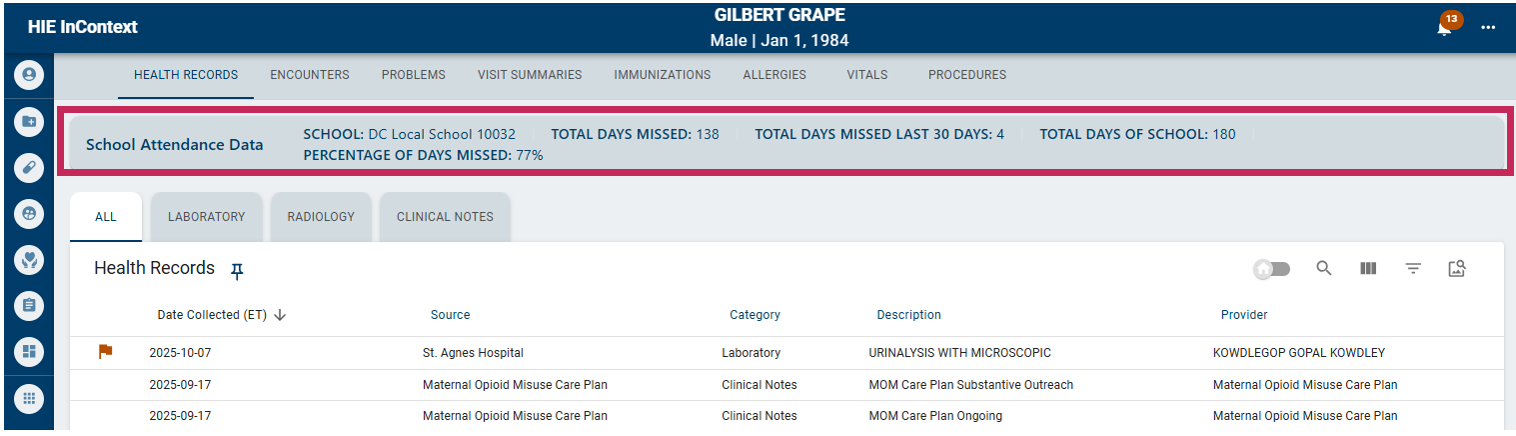
School Attendance Data Dictionary:
| Data Point | Definition |
|---|---|
| School | Name of the school associated with each student |
| Total Days Missed | A tally of absences for each student in the current school year |
| Total Days Missed in the Last 30 Days | Running total of absences in the past 30 days |
| Total Days of School | Running total of the school days in the current year |
| Percentage of Days | Current percentage of days missed out of total school days up until the current date |
Partnership with Children’s National
CRISP DC also works with Children’s National on the Collaborative for Attendance Resources in Education and Health (CARE-H) project to share weekly attendance files that reflect their patients’ attendance data, as well as specific health data points that the DC HIE receives. The Children’s team utilizes this file to identify patients who are at a high risk of missing school due to health or social reasons. The Children’s team then performs individualized proactive outreach to those students’ families to better understand the issues that the student is facing and provide the family with resources to resolve health or related issues.
Frequently Asked Questions
Resources
- December 2025 Webinar Recording