
A Streamlined Way to View Key Laboratory Testing Data via InContext
What’s New:
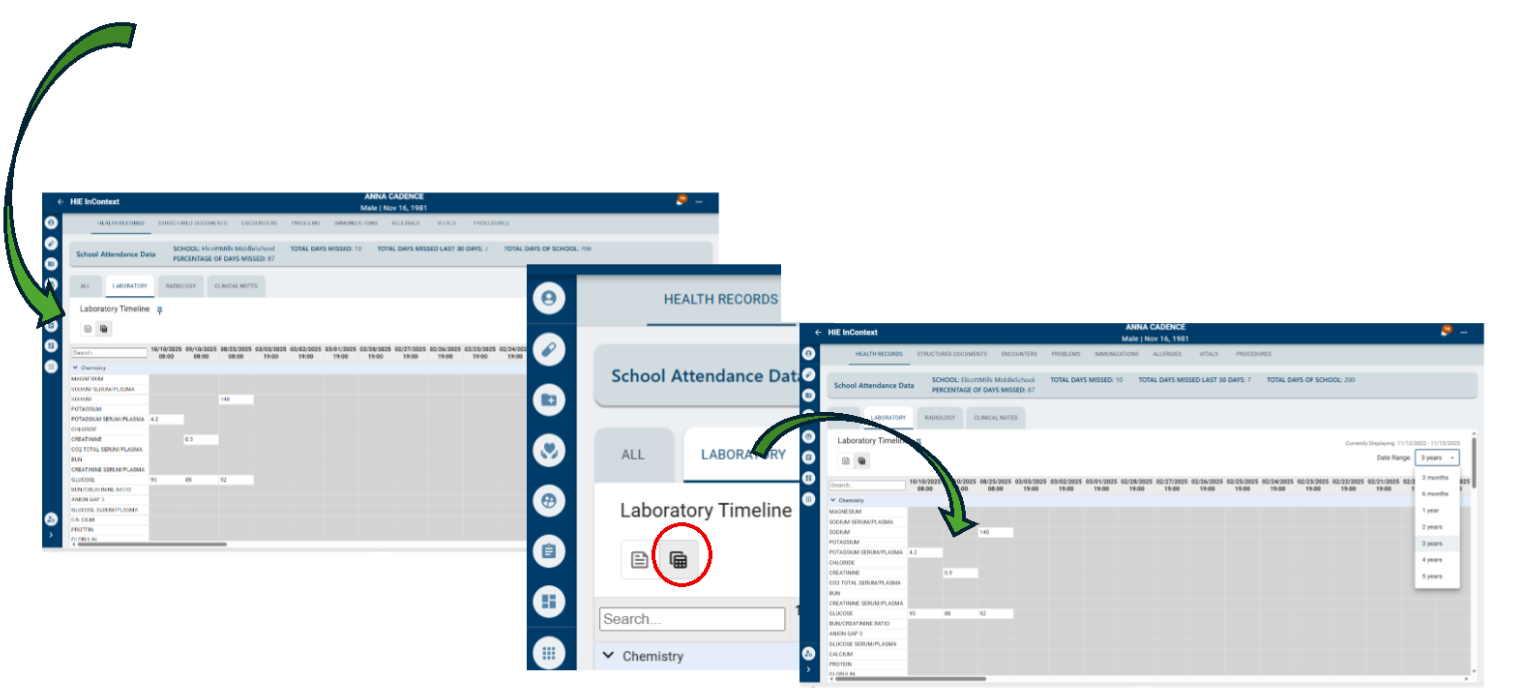
This new feature within InContext allows users to view a patient’s laboratory testing data in a timeline format, enabling easy identification of data trends over time.
What is Staying the Same:
The “List” (classic) view of information will remain available. Users can toggle between the “List View” and the “Timeline View.”
In the “Laboratory” tab of the patient’s “Health Record” page, users will see the original “List” icon. The new “Timeline View” icon is placed to the right of the “List”
icon, enabling quick toggling between two views. Select the “Timeline View” icon to view available laboratory results. Default view is the most recent 3 months, with up-to 5 years’ data available to filter
User Benefits:
- Enables users to more easily identify changes to patient labs and see trends over time
- Saves the user time, limits clicks and searches
- Supports informed decision-making with faster access to relevant data
Click to enlarge.
Additional questions? Contact our outreach team via email at dcoutreach@crispdc.org.